What is an AI-native workspace (and why teams use one)
AI-native workspaces help teams build initiatives as structured pins, track programs where everyone can see them, scale patterns across projects—and share either whole surfaces or the exact pins stakeholders need.
Most teams already have cloud storage, chat, and maybe a wiki. An AI-native workspace sits on top of that habit stack: content stays structured, searchable, and actionable, and assistants understand your boards and pins—not only isolated documents.
In plain terms, teams adopt this model when they need to build, track, and scale real initiatives—and share them clearly with teammates and clients—without losing half the story in attachments and tabs.
Build, track, scale—and share
These four verbs are the spine of how people describe the job—an AI-native workspace is built to support all of them on one coherent surface.
Build
You compose work from typed pins on canvases: narrative (Markdown), structure (tables, JSON), signals (charts, stat cards), and execution shape (roadmaps, boards, checklists)—so “the initiative” is something you assemble, not one fragile doc.
Track
Programs stay visible: status, KPIs, risks, and next steps live beside the materials they reference—fewer “which spreadsheet is live?” moments. As products evolve (e.g. live boards or agent outputs), the same pattern applies: watch progress where decisions already live, instead of bolting on another dashboard silo.
Scale
Patterns compound: reuse pin layouts across projects, mirror projects for parallel initiatives, lean on permissions and team spaces so more people can work from the same vocabulary (pins + canvases) instead of reinventing formats every quarter.
Share
Sharing isn’t an afterthought—you ship whole canvases or pages when the full narrative matters, and you can emphasize specific pins when someone only needs the proof (metrics, timeline, brief)—plus permissions and public links when you’re ready for clients or partners to see an approved slice of truth.
Advantages at a glance
| Advantage | You feel it when… |
|---|---|
| One structured surface | Metrics, narrative, and tasks sit together—not in five tabs. |
| AI with workspace context | Ask AI across pins you chose, not random pasted text. |
| Less export theater | Fewer PDFs and “paste into Slides” loops to tell the same story. |
| Iteration without forks | You refresh canonical pins instead of scattering conflicting copies. |
| Sharing that matches the audience | Whole board or the exact pins stakeholders need—same underlying atoms. |
| Room to grow | Solo synthesis → team canvases → client-ready surfaces without changing tools. |
Why “AI-native” is different from “AI bolted on”
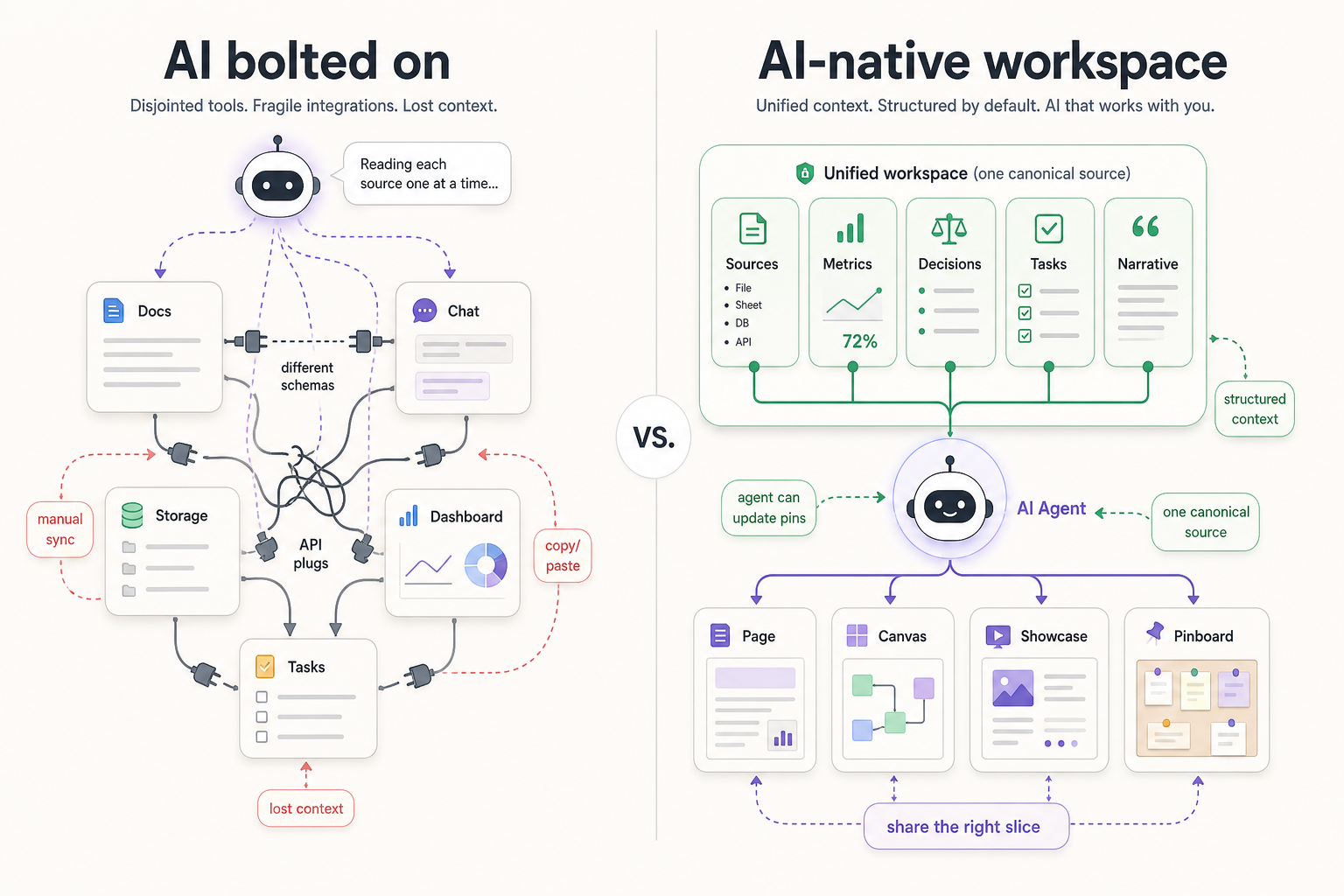
Existing tools can bolt AI into their app, but that does not automatically make the workspace AI-native. If the user still has to connect the docs, tasks, dashboards, files, and context by hand, the assistant is only sitting on top of the old workflow. The experience depends on manual setup, integrations, and careful prompting to make scattered information feel connected.
An AI-native workspace starts from the opposite direction: the context is already organized as structured objects the agent can understand. That is why the out-of-the-box experience matters. You should not have to rebuild your workspace around the AI before it becomes useful; the workspace itself should already be shaped so AI can access, update, and assemble the work.
Context-aware help
A bolt-on assistant reads one file at a time. A workspace-native assistant can reason across pins, tables, and narratives you already arranged for the problem—so answers match how your team thinks.
Less copying between tools
When summaries, metrics, and decisions live beside sources on one canvas, you spend fewer cycles exporting PDFs or pasting ChatGPT threads into Slides.
Built for iteration
AI-native workflows assume outputs change: you regenerate summaries, tweak tables, and keep one canonical pin instead of ten conflicting attachments.
Humans stay in control
The goal isn’t autopilot—it’s faster alignment. Leaders still approve; contributors still edit—but everyone sees the same structured surface.
How this maps to Pindown
Pindown is an AI-native workspace in practice: projects scope who and what feeds an initiative; canvases hold the built story; pins make tracking legible; patterns and permissions help you scale; links and access control help you share responsibly. Ask AI runs across what you’ve pinned—so build, track, scale, and share stay tied to the same objects instead of dissolving into chat history.
Frequently Asked Questions (FAQ)
Is this replacing Google Workspace or Notion?
Usually no. Teams often keep mail/calendar and docs; Pindown fits where decisions and storytelling need a dedicated canvas with pins—and where build / track / scale / share needs to stay one workflow.
Do we need engineers to use an AI-native workspace?
No—contributors use familiar patterns (boards, tables, text). Power users can wire APIs and workflows when you’re ready.
What’s the first habit to adopt?
Pick one initiative (e.g. a quarterly review or pitch) and mirror its artifacts as pins on a single canvas so search and AI share real context—then decide what you’ll share outward (surface vs specific pins).
How do we avoid junk outputs?
Pin sources, pin structured outputs, and label uncertainty—then iterate on the same surface instead of emailing drafts.