Closed Beta - Quickstart
Quickstart for Invited Users
Welcome to Pindown!
This quickstart helps invited users begin fast and get the most out of the app from day one.
How to Start
Start with the Chat
- This is where you begin with your first prompt.
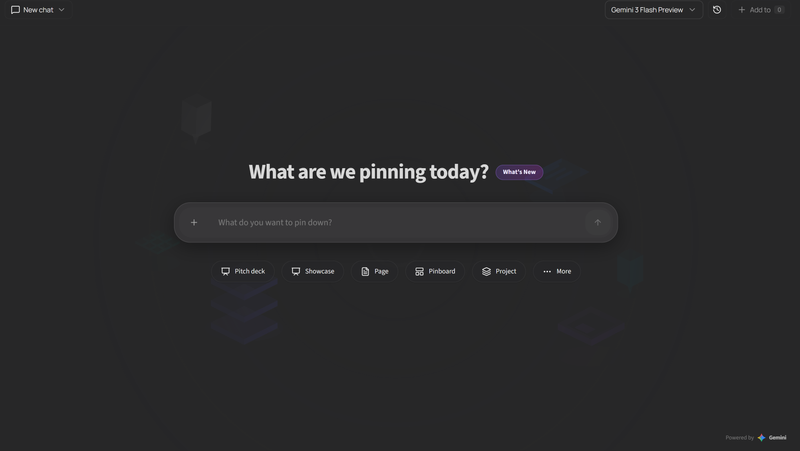
- On the launch page, you will find the main chat interface.
For your first prompt, it helps to understand a few core features.
Core Features You Should Know
On the landing page, you start with a chat window. You can choose one of three AI models:
- Gemini Pro ( most capable )
- Gemini Flash Preview ( balanced )
- Gemini Flash Lite ( fast )
Keep in mind: more capable models generally use more coins.
Preselect an Outcome

You can preselect an output format before prompting. This gives the AI better context and often improves result quality.
Within these format options, there are small wording hints that help guide the AI toward the structure you want.
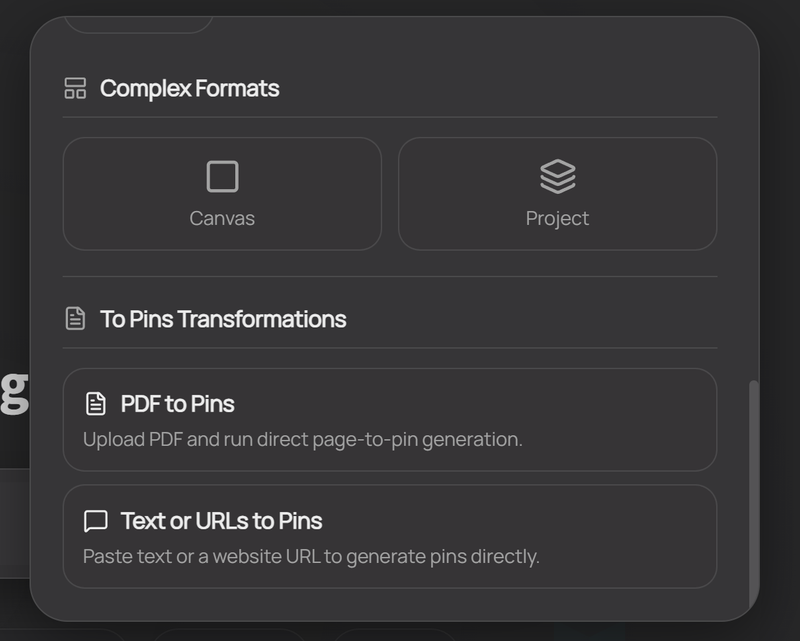
Pins and Complex Formats
In Pindown, almost everything is a Pin, regardless of what data you want to display or generate.
You can also use Complex Formats when you want a more structured result.
Check both:
PinsComplex Formats
...to quickly understand what is possible.
Project Structure Basics
For the Projects section, you only need a few naming concepts:
- Project
- Channel
- Tab (default context)
Just tell the AI what you want to generate using these terms, and it should create the structure for you.
Manual Editing Options
You can also do many actions manually:
- with right-click menus
- by hovering over interactive areas
Final Note
Have fun, be productive like never before, and explore the app.
Thank you for joining!