
What is Pindown? The simple intro
New here? The simple intro to Pindown: what it is, who it is for, and what you actually do with it. One workspace where AI builds typed pins, your automations keep them live, and you share client-ready work without rebuilding a thing.
Pindown is an AI-native workspace where your work becomes something people can see, not another folder of files. You describe what you need and Pindown builds pins: typed blocks like tables, charts, stat cards, Markdown, roadmaps, and checklists. Those pins live inside formats such as pages, pinboards, projects, canvases, and pitches, so the same information can be a plan, a live dashboard, or a client-facing story without being rewritten.
The short version: you describe the outcome, Pindown builds the deliverable, your automations keep it live, and you share one link.
Watch the intro
This loads content from YouTube. Data may be sent to Google. Only click if you agree. Privacy Policy
The problem Pindown solves
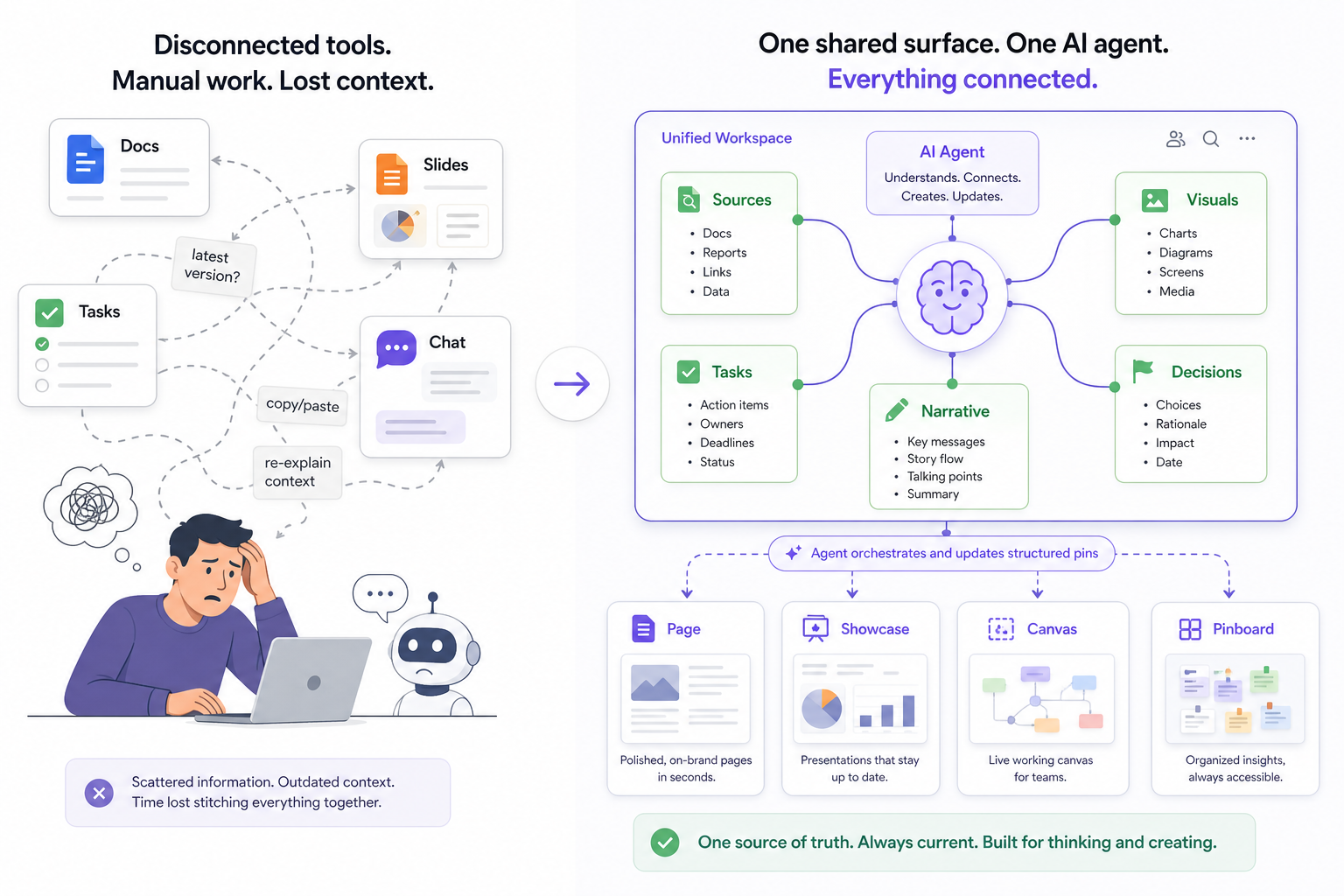
Most work today is scattered across too many tools. Notes live in one app, data in another, the deck in a third, and the "latest version" is whoever you last spoke to. Before the work even has context, you are copying notes, linking sources, and re-explaining to an AI how the pieces relate.
AI on its own does not fix this. A chat window gives you a wall of text that you still have to format, paste, and rebuild for the client. The answer is good; the deliverable is still your job.
Pindown brings the pieces together by design. Sources, visuals, decisions, and live data sit next to each other as pins an app-wide agent can read and update. You stop assembling outputs by hand and start requesting them, then deliver through pins, pages, and shareable formats.
What is a pin (in one sentence)?
A pin is a typed block (a table, a chart, a checklist, a brief, a board) that you create once and place into any format, while keeping it scannable, reusable, and updateable from a single place.
Watch the same four pins rearrange themselves into different formats:
What you actually do in Pindown
| Pillar | In practice |
|---|---|
| Create | Ask for an outcome and get typed pins (charts, stat cards, tables, checklists, briefs) in one pass, not a wall of text to reformat |
| Organize and plan | Build projects and canvases where pins stay linked in context, so plans and decisions sit in one complete picture |
| Keep it live | Push updates from n8n, Make, Mastra, cron jobs, or your API straight into pins, so dashboards reflect what your systems know right now |
| Stay in charge | Add approval queue and flow trigger pins so agents pause for a human before anything goes out |
| Share with control | Send a single pin or a full format, with organisations, custom roles, and pin-level access so each audience sees only what they should |
Who is it for?
- AI builders and automators who want pipeline output to land as a client-ready surface instead of a raw JSON dump.
- Agencies and client teams who deliver recurring reports and want one live link per client, not another export.
- Ops and product teams who need the plan, the live metrics, and the sign-off in one room.
- Anyone tired of slide decks and docs that never match the live data.
What Pindown is not (so expectations stay honest)
- Not a replacement for your whole email and calendar stack.
- Not just storage. The value is structure plus context, not another file dump.
- Not a no-human autopilot. Pindown is built so people stay in the loop on what agents send.
Frequently asked questions
I only have five minutes. What should I try first?
From /home, ask for a few pins in one prompt, for example a short Markdown brief, one chart, and one table. Drop them on a pinboard, then Ask AI a question that references those pins.
How is this different from Notion or Google Docs?
Those tools are great at documents. Pindown is built around typed pins, visual formats, and an app-wide agent. A pin lives in pages, pinboards, projects, canvases, or pitches, so you update it once instead of duplicating the same information everywhere.
How is it different from a chatbot like ChatGPT or Claude?
Chat gives you an answer in a thread. Pindown gives you a deliverable: a typed pin you can share, reuse, and let your automation update. The product is the pin, not the transcript. See What makes Pindown different.
Can my automations update pins without me in chat?
Yes. Every pin is API-addressable, which is how n8n, Make, Mastra, and scripts keep dashboards live without copy-paste.
Can humans approve before an agent acts?
Yes. Add an approval queue pin: when a flow needs a human, it pauses until a teammate approves, then your webhook resumes the run. Flow trigger pins let a person start a workflow on purpose.
Can I use it solo?
Yes. Starting solo, you get one place to create, organize, monitor, and share, so your context stays in one workspace as your work grows.
Where do I go deeper?
- What makes Pindown different: the full case, including human-in-the-loop and access control
- The atomic approach: reuse pins across formats
- Pins explained: why typed blocks beat documents
- Pindown Quickstart: formats and a video walkthrough