Pindown vs Notion: who each tool is for (and when to use what)
A neutral guide: how Notion and Pindown compare as a package, who each fits best, when to pick docs-and-databases vs pin-first canvases—and why many teams use both.
This isn’t about declaring a winner—it’s about fit. Notion and Pindown solve overlapping pains with different centers of gravity. Many teams use both: Notion for filing and long-form, Pindown when initiatives need mixed-format storytelling, typed pins, and workspace-aware AI.
If you only read two sections, skim Who Pindown is for and When to use which below.
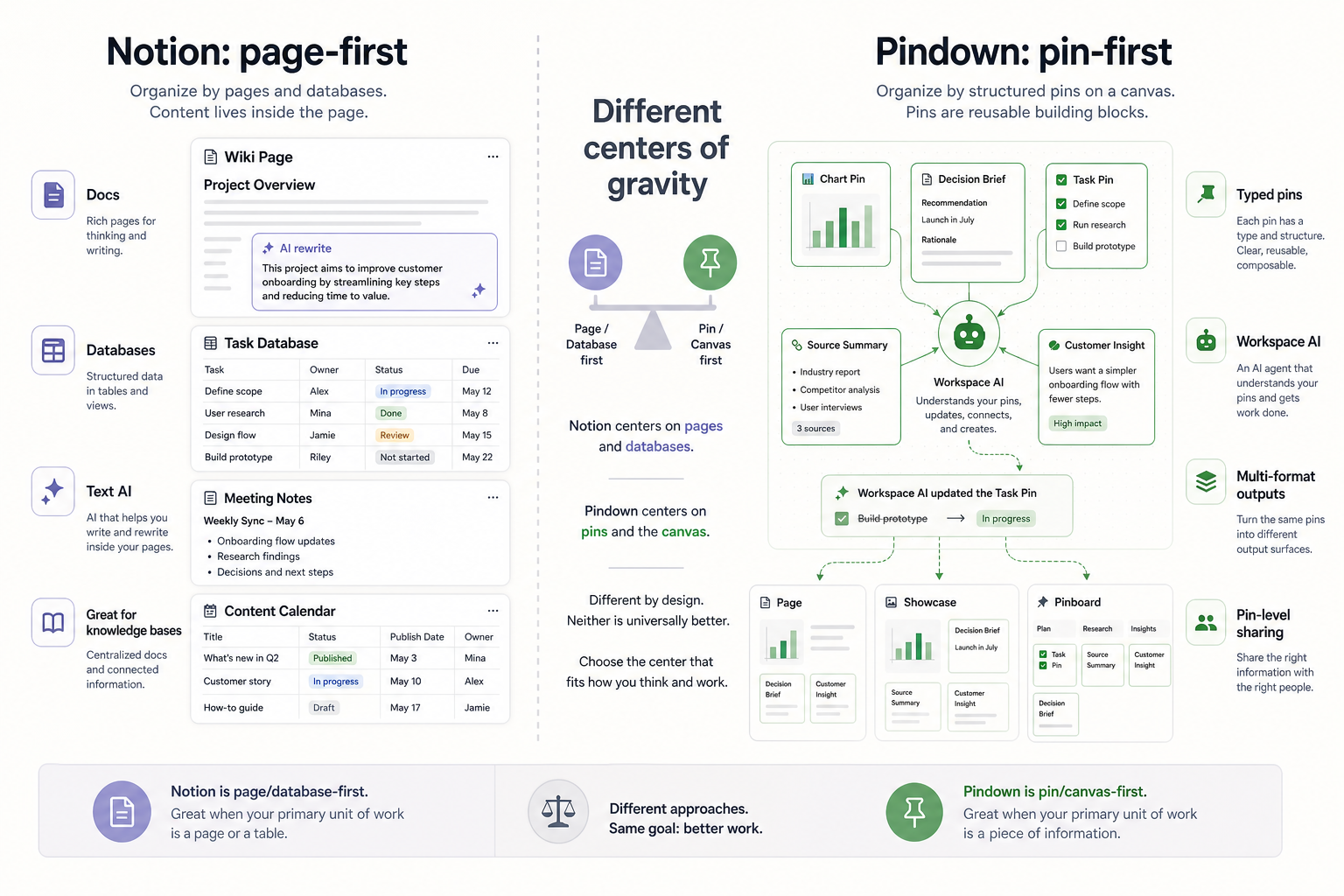
The whole package in one pass
| Notion (page & database first) | Pindown (pin & canvas first) | |
|---|---|---|
| Center of gravity | Pages and databases—write, file, query rows | Pins on canvases—compose narrative + structure + metrics in one view |
| Default “unit” of work | Block, page, or DB row | Typed pin (table, chart, markdown, board item, JSON, etc.) |
| Sweet spot | Wikis, handbooks, meeting notes, task DBs, personal productivity | Initiatives that show up as briefs, boards, decks, and dashboards in the same month |
| How AI usually feels | Strong at drafting and summarizing text inside pages | Workspace-native: start in chat, create resources, update pins, and keep the thread connected to the work |
| Sharing instinct | Share a URL to a page or database view | Share a canvas or page or surface specific pins for an audience |
| What “done” often looks like | A well-maintained system of docs and tables | A composed story on a canvas—same atoms reused across formats where it helps |
Neither column is “better” globally—it’s which job is primary this quarter.
Where the AI workflow separates
Both Notion AI and Pindown’s AI chat can help you start from a prompt: draft a resource, summarize material, and shape the first version of an answer.
Both can also help with editing and updating existing information. If your goal is “rewrite this,” “summarize this,” or “help me understand this page,” a page-first AI experience can work well.
Where Pindown starts to pull away is what happens after the resource exists. You can open the resource itself, keep interacting with it, and still have the relevant chat thread and workspace context available. The agent can make changes to the actual pins, create another format from the same information, or share only the specific pieces that matter externally. That is where a page-first tool tends to fall off: the AI may help with the page, but the deliverable, reuse, and granular sharing still become manual work.
Who Notion is for
Notion is a strong default when the work is mostly reading, writing, and tabular tracking:
- Company wiki, policy library, and meeting notes that live for years.
- Personal and team task systems you tune with views, filters, and properties.
- Content calendars, lightweight CRMs, and “single source of list” use cases.
- Teams that want infinite flexibility inside the page model and are happy reshaping content by hand when the story changes.
If your week is “capture, organize, and link pages,” Notion is hard to beat.
Who Pindown is for
Pindown is aimed at teams whose work is visually composable and audience-specific—the same truth has to show up as narrative, numbers, and tasks without retyping:
- Product, consulting, research, and operations running initiatives with stakeholder updates and client-facing surfaces.
- Leaders and ICs who are tired of exporting the same metrics into slides, email, and trackers.
- Anyone who wants AI to act on structured objects—“update this table pin,” “compare these three blocks”—not only “write another paragraph.”
- Groups that need two-level sharing: the full board for one meeting, only the proof pins for another.
If your week is “build, track, scale, and share a live story,” Pindown’s model tends to feel lighter. For vocabulary, see What is Pindown? and The atomic approach.
When to use which
| Situation | Lean toward |
|---|---|
| Playbooks, policies, long-form knowledge | Notion (or your doc tool of choice) |
| One initiative, many surfaces (brief + board + metrics) | Pindown |
| “We live in a database of tasks” | Notion-style views are a natural fit |
| “We need one canvas where execs and builders see the same picture” | Pindown |
| AI that rewrites text in a page | Notion (and friends) do this well |
| AI that can keep working from the chat thread into the resource itself | Pindown |
| AI that mutates pins and canvases, creates other formats, and shares selected pieces | Pindown’s sweet spot—see AI-native workspace |
| You only need a link to a page | Notion |
| You need page or pin-level sharing for trust | Pindown’s atomic model |
Using both in one stack
A common pattern:
- Notion (or Confluence, Google Docs) for handbooks, notes, and static reference.
- Pindown for initiative rooms: canvases where pins carry the live program story—then link out to deeper docs when needed.
The goal is clarity of ownership: “policies live there; this quarter’s program lives here.”
A five-question smell test
- Is the primary artifact a document or a composed board? → Doc favors Notion; board favors Pindown.
- Do you retype the same numbers into different formats weekly? → Pin-first usually helps.
- Should AI change workspace objects, not just text? → Pindown’s model is built around that.
- Is granular sharing a recurring pain? → Compare how you’d share one block of truth today.
- Can you start narrow—one Notion for reference, one Pindown project for the initiative you care about most?
Frequently Asked Questions (FAQ)
Is Pindown trying to replace Notion?
No. Pindown is for a different center of gravity (pins, canvases, multi-format initiative work). Many teams keep both and use each where it fits.
We already use Notion—do we have to migrate?
Not usually. Start with one program in Pindown, keep handbooks and notes where they are, and link between systems until the split feels natural.
What should we read next in Core product?
- What is Pindown? — product intro
- The atomic approach — pins across formats
- AI-native workspace — build, track, scale, share
What if we’re unsure after a month?
Revisit the five-question smell test above. If your pain is documentation depth, invest in your doc tool. If your pain is same truth, many surfaces, invest in pin-first workflows.