Your second brain is made of pins: how Pindown's AI uses your knowledge
A second brain only works if your AI can find, read, and act on what you saved. In Pindown, pins are the knowledge units—and Ask AI navigates your workspace structure to load them, not just search text.
Most "second brain" tools are good at storing things. You capture notes, clip articles, file PDFs, and link pages together. The hard part starts later: when you ask a question, can the AI actually use what you saved?
In Pindown, the answer is built into the product model. Your second brain is not one giant document or a folder of files. It is a workspace of typed pins—briefs, tables, charts, decisions, research, checklists—organized inside formats like Pages, Pinboards, and Projects. When you open Ask AI, the agent does not guess from a wall of text. It navigates your structure, loads the pins that matter, and works with them as real objects.
This article explains how that works—and why it changes what "AI on top of your knowledge" can mean.
What "second brain" means in Pindown
A second brain is only useful if three things stay true over time:
- Capture — new information lands somewhere durable, not in a chat scroll
- Structure — you can find related work without re-reading everything
- Recall — when you (or your AI) need an answer, the right context shows up
Pindown handles all three through pins:
- A Markdown pin holds a brief, meeting note, or research summary
- A table pin holds comparisons, pricing, or competitor matrices
- A chart pin holds trends your team tracks
- A checklist or kanban pin holds what still needs doing
- A chat pin can thread a conversation with linked pins attached as context
Those pins live inside formats. A Page compiles them for reading. A Pinboard lays them out for review. A Project groups channels, tabs, and team conversation into one growing vault—Discord-style navigation with an Obsidian-style habit of building knowledge over time.
That is the second brain: not a single note app, but a composable library of pins your team keeps extending.
Why pins beat "one big doc" for AI memory
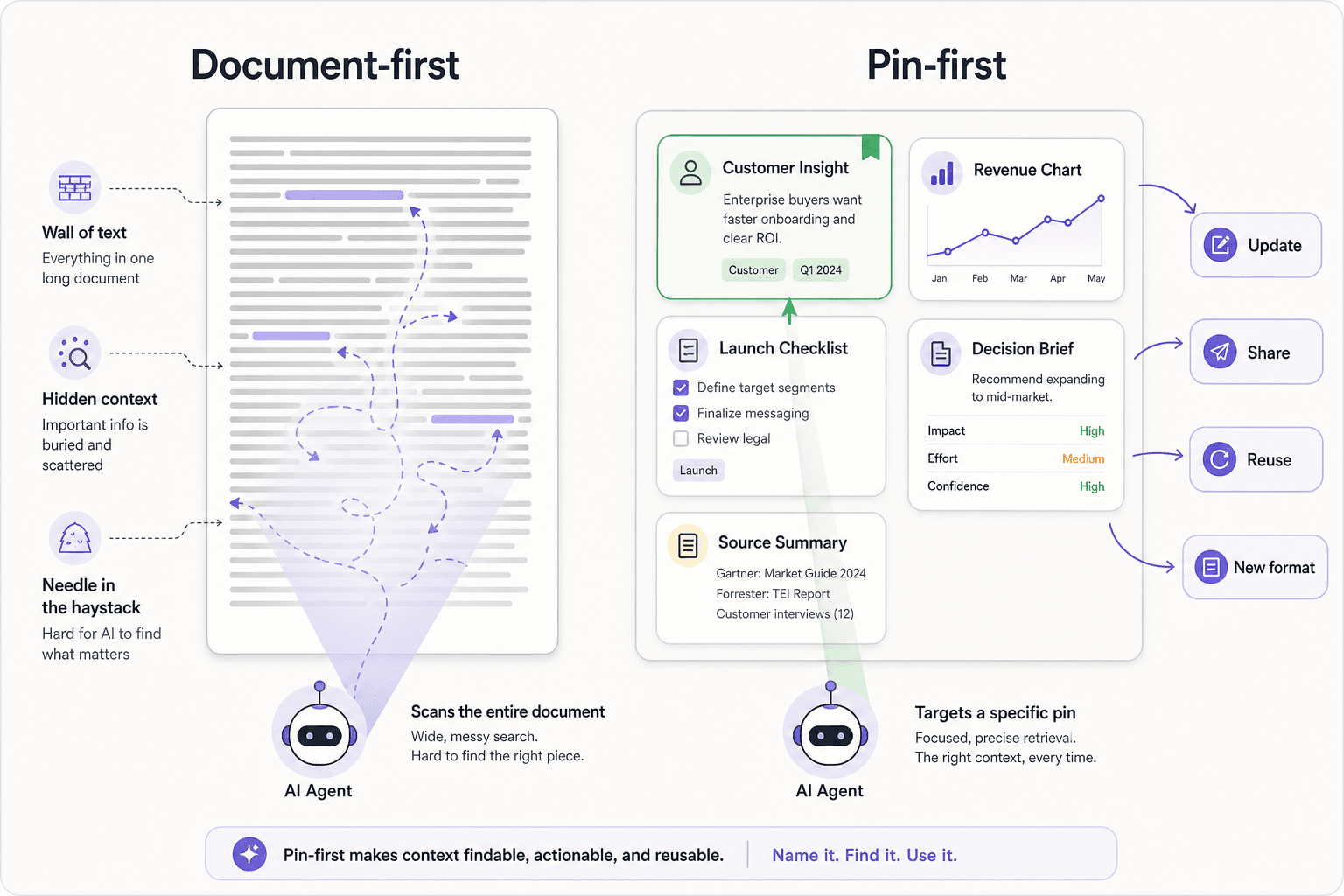
Generic AI assistants often rely on semantic RAG: chop documents into chunks, embed them, retrieve similar paragraphs, and hope the model picks the right sentence.
That works for archives. It struggles in live workspaces where briefs change, tables get updated, and the same fact lives in three places. Chunks go stale. Similar text is ambiguous. The agent sees paragraphs, not objects.
Pindown's approach is pin-first agentic retrieval. Instead of searching a haystack, the agent targets named pins with types, titles, metadata, and permissions. Read more in Agentic RAG vs semantic RAG.
Semantic search hunts for similar words in a wall of text — close, but ambiguous.
The agent targets a named pin — a real object it can update, reuse, and share.
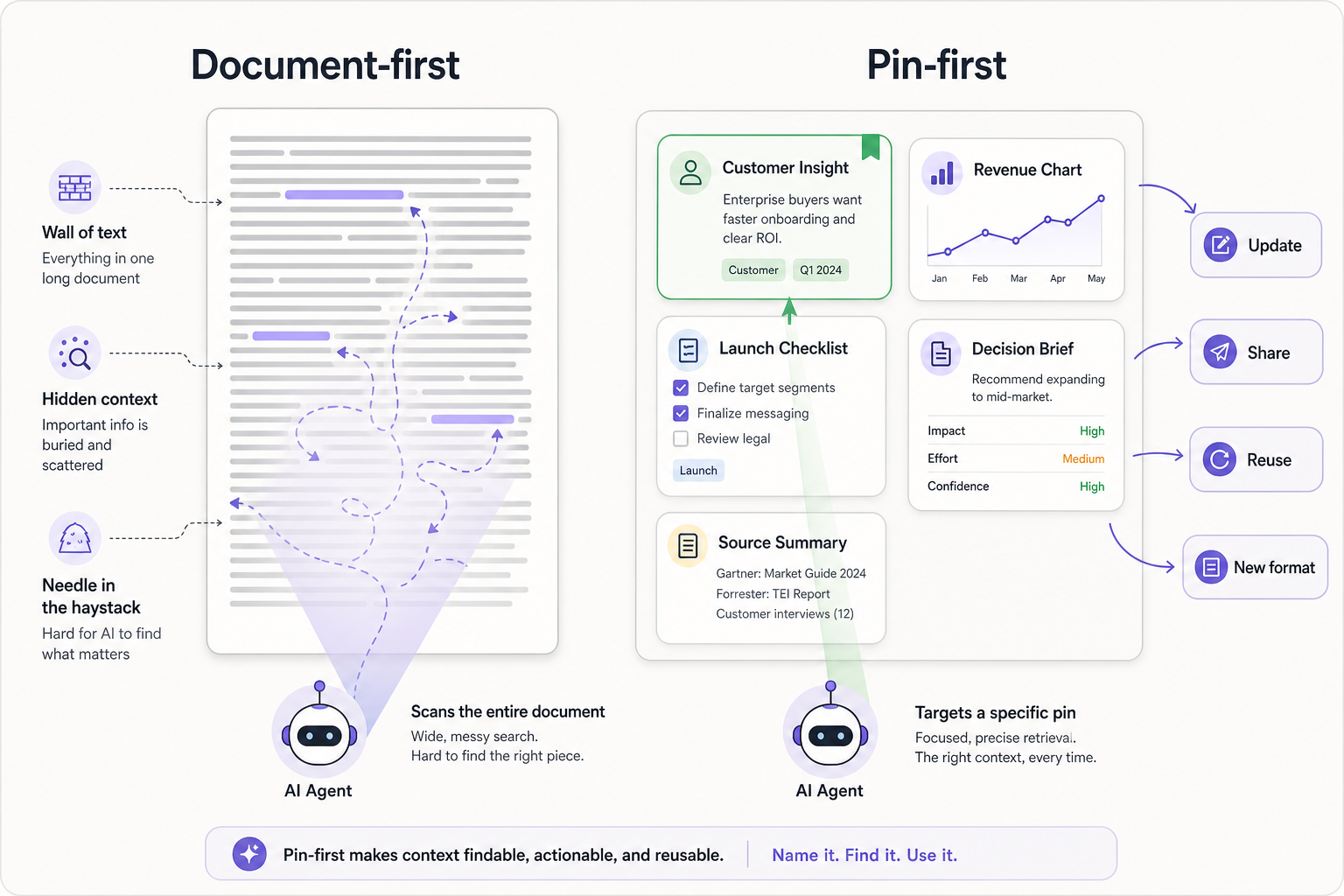
The payoff: when you ask "what did we decide about pricing?" the agent can load the pricing decision pin—not every paragraph that mentions the word "pricing."
How Ask AI reads your workspace
Ask AI (Pindo) is available across Pindown—from /home to a Page, Pinboard, Pitch, or Project tab. What changes is scope: the agent knows where you are standing and reads from that context first.
Standing inside a format
When you open Ask AI on a Page or Pinboard, the pins on that surface are usually already in context. For content questions, the agent calls load pins and pulls the live content—up to a focused batch at a time.
For Markdown pins, that means the current collaborative text, not a stale copy buried in config. Your briefs and notes stay in sync with what humans are editing.
Standing inside a Project
Projects are the team second brain. Channels and tabs organize work by topic—client delivery, research, launch planning. Here the agent follows a deliberate path:
- Understand structure — which channel and tab you are on, and what else exists in the project
- Navigate — inspect the project tree when the answer might live on another tab
- Load pins — fetch the specific pins that hold the answer
You do not have to paste context into chat. The workspace is the context.
Searching from anywhere
From /home or outside a specific format, the agent can find pins across your workspace by title and type, then load the matches. It can also list formats and inspect structure before loading—so "show me our Q3 research" becomes a targeted pin pull, not a vague summary of everything you ever wrote.
How knowledge gets into the brain
A second brain is empty until you feed it. Pindown gives you several ingestion paths—each producing pins, not orphaned chat text.
1. Chat superpowers → persistent pins
Pindown chat turns prompts into typed pins: tables, stat cards, briefs, checklists. Deep research runs multi-pass web investigation and lands findings as cited reports and comparison tables. Artifacts & analysis generates real files—and the summary becomes durable workspace content.
The pattern is AI-to-Asset: chat produces objects you keep, not transcripts you lose.
2. Neural Refinery → atomic pins from documents
Upload a PDF, spreadsheet, or office doc to the Neural Refinery. It decomposes the document into sections and emits atomic pins—one table here, one brief there, charts where the numbers live. A 40-page report becomes a pin library the agent can target individually.
That is how legacy knowledge enters the second brain without staying trapped in one file.
3. Factory → multi-source pin generation
The Pin Factory workflow combines files, research output, datasets, and workspace context into new pins arranged on a Page or Pinboard. Prior agent work becomes input for the next—your brain compounds.
4. Human capture → live collaboration
Of course you can also write directly: Markdown pins for notes, tables for comparisons, pinboards for monitoring. Pins update in real time; teammates edit the same brief; the agent always reads the latest version.
Project snapshots: indexed team memory
For large projects, Pindown can create a project snapshot—a versioned copy of project structure and content indexed for the workspace agent. That agent searches the snapshot with workspace query (BM25 full-text search) so questions like "what did we promise in the SOW channel?" can span the whole project, not only the tab you have open.
Snapshots are how a team second brain scales: structure for day-to-day navigation, search for cross-project recall.
Linked pins: conversations grounded in facts
Chat pins inside a Project can attach linked pins to messages. A thread about a launch might link the roadmap pin, the budget table, and the decision brief. When you or the agent revisit that thread, the facts are one click away—not re-explained from memory.
That is second-brain behavior in practice: conversation stays lightweight; knowledge stays in pins.
A simple mental model
| Layer | What it is | AI uses it to… |
|---|---|---|
| Pin | One typed knowledge unit | Load content, update, reuse, share |
| Format | Page, Pinboard, Pitch, Canvas… | Scope answers to the surface you are on |
| Project | Channels, tabs, team vault | Navigate team knowledge by topic |
| Snapshot | Indexed project copy | Search across the whole project |
| Ask AI | App-wide agent | Find → load → act on pins |
You build bottom-up: pins first, formats to compose them, projects to organize teams, snapshots when the vault gets large.
What this means day to day
- Research sprints end as pins on a board—not a PDF in Downloads
- Client work lives in a Project channel; Ask AI answers from that channel's tabs
- Decisions get their own Markdown pin; the agent updates one object, not five docs
- Onboarding means "read these pins," not "grep the wiki"
- Sharing can mean one chart pin or one brief—not the entire vault
Your second brain is not a place you visit occasionally. It is the same workspace your AI works in.
Frequently asked questions
Is this just another note-taking app with AI?
No. Note apps optimize writing pages. Pindown optimizes typed, reusable pins inside an agentic workspace. The AI is not a sidebar on documents—it loads, updates, and creates pins as first-class objects.
Do I need a Project for a second brain?
No. Solo users can build a brain from pins, pages, and pinboards on /home. Projects add channels, tabs, and team access when the knowledge belongs to a shared effort.
How is this different from semantic search / RAG?
Semantic search finds similar text. Pindown adds structure: pin type, title, location in a project, permissions, and agent tools to target the right pin. Embeddings can supplement that; they are not the whole architecture. See Agentic RAG vs semantic RAG.
Can the AI hallucinate if it loads the wrong pin?
Pin-first retrieval reduces "random chunk" errors because the agent names what it loaded. You can inspect which pins were used, open them, and correct the source pin—not hunt through a 50-page doc.
What should I read next?
- Atomic pins: the universal building block — the unit your brain is built from
- Projects: team workspaces — the team vault model
- Pindown chat has superpowers — how knowledge enters via chat
- Thinking in pins — the mindset shift
- How to use Ask AI across your workspace — practical workflow