Pindown Quickstart
A quick guide to Pindown's formats, pins, app-wide agent, and workspace workflow.
Start here
Watch the quickstart walkthrough:

This loads content from YouTube. Data may be sent to Google. Only click if you agree. Privacy Policy
We recommend starting from the /home chat. Describe what you want to create, choose the format that fits the job, and let Pindown help turn your prompt into something you can keep working with.
Overview
Choose the right format
Before you start, choose the format that matches what you want to create:
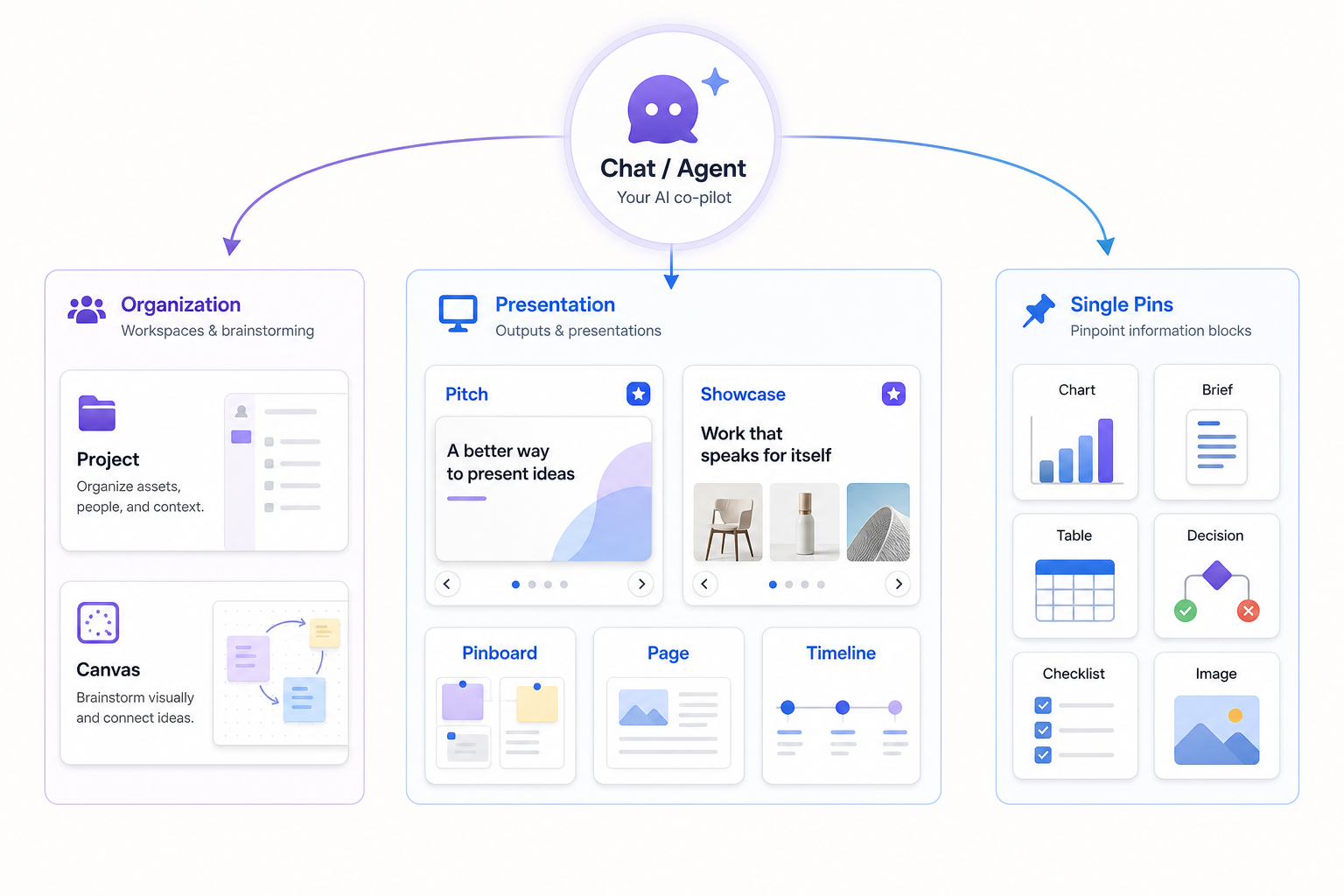
Every format in Pindown is a composition of pins: the format is the container, and pins are the reusable building blocks inside it. If you want the full list, read the pin formats overview.
- Pins — one focused piece of information: a chart, brief, decision, table, image, checklist, or reusable block.
- Page — a readable document-style surface that compiles information. Pages guide.
- Pinboard — related pins on one board for review, comparison, monitoring, or sharing. Pinboards guide.
- Showcase — the slide alternative: quick, swipeable highlights from pins. Showcase guide.
- Pitch — in-depth narrative decks with tabs for detailed sharing and live meetings. Pitch guide.
- Canvas — a large free-form surface for brainstorming, mapping ideas, and arranging pins spatially. Canvas guide.
- Project — a team workspace that groups related pins, pages, boards, chat, and more in one place. Projects guide.
- Timeline — events, milestones, roadmap items, or steps in order.
App-wide agent note
While you can manually create every format from scratch, Pindown is designed for working closely with the app-wide agent. To make the most of the agentic workspace and get more work done in a short amount of time, describe the outcome you want and let the agent help create the right pins and format. Keep manual work for human-in-the-loop review, small edits, and quick adjustments. For the mindset shift, read Thinking in pins.
Keep working or share
Once the format is created, you can keep working inside it or share it. Edit the pins, reorganize the page, refine the canvas, adjust the showcase or Pitch, or share the finished result with the people who need it. Most importantly, build and grow your workspace into a vault or second brain you can access anytime and keep building on top of.