What makes Pindown different from other AI workspaces
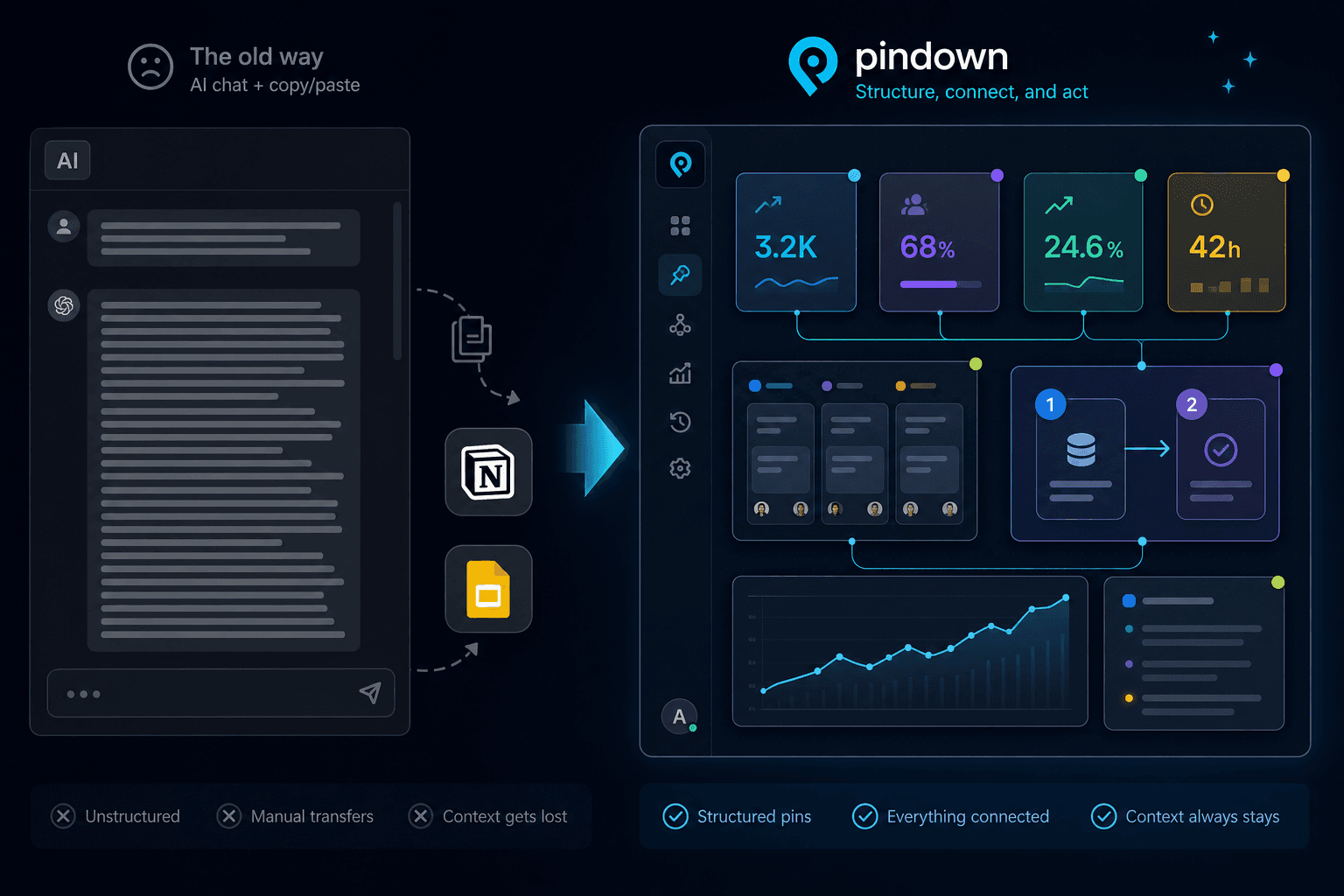
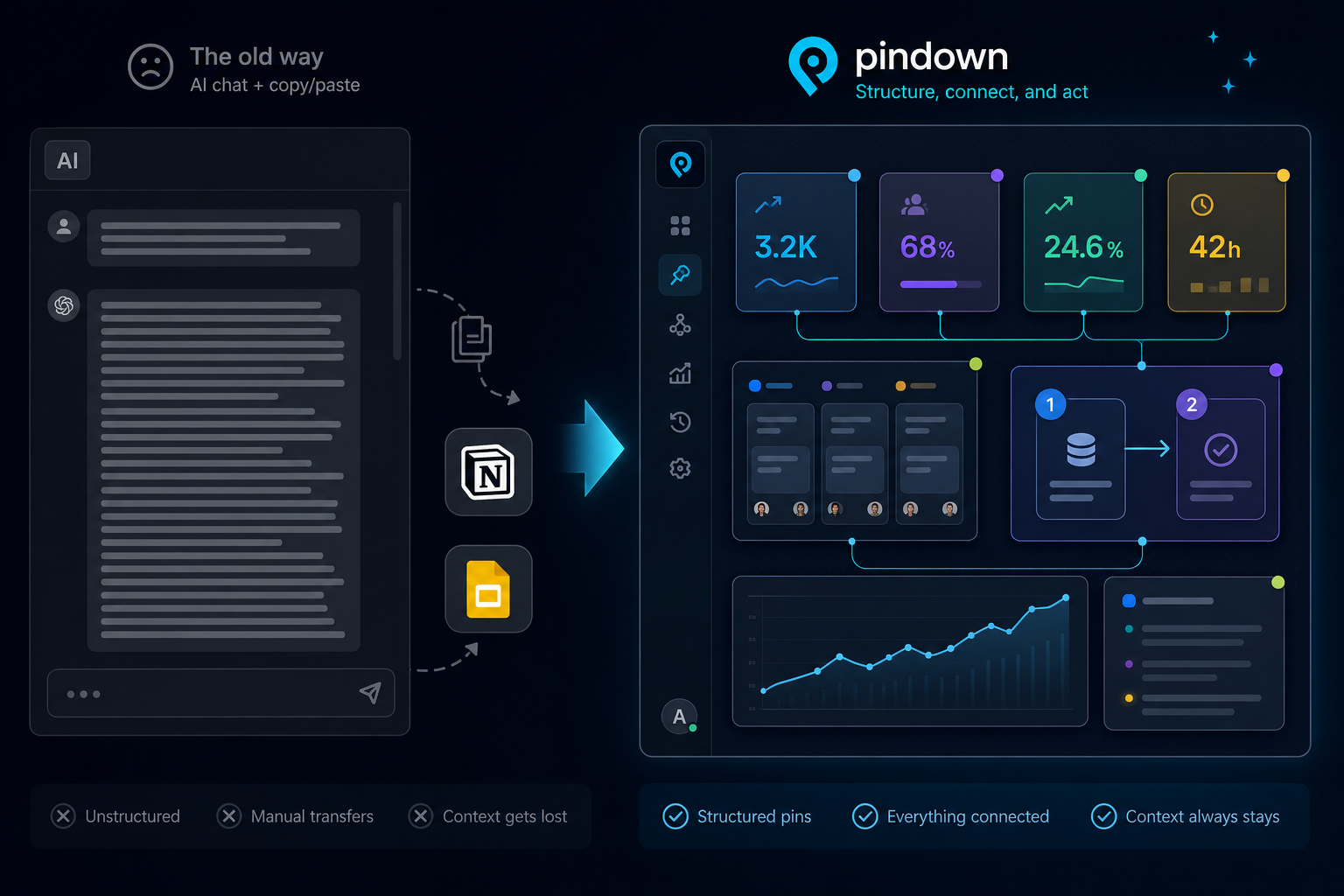
Most AI tools hand you a wall of text and leave the real work to you. Pindown turns one prompt into typed, shareable pins, keeps them live with your automations, and adds human approvals and role-based access so agencies and ops teams ship client-ready work with confidence.
Every AI tool sells the same picture: a chat box, some docs, maybe an agent in the sidebar. It looks great in a demo. Then you try to ship something real (a KPI board for a client, a launch checklist your team actually follows, a brief that updates when the pipeline runs) and the cracks show. You are back to copying text into Notion, rebuilding a slide for the call, and pasting a screenshot into Slack to explain what changed.
Pindown is built for that last mile. You describe the outcome and Pindown builds typed pins (stat cards, tables, charts, checklists, roadmaps, approval queues) in a single pass. Those pins stay live as your automations write to them, humans approve what goes out, and everyone opens one link that shows exactly what their role is allowed to see.
This article is the honest version of why that matters, and where Pindown is not the right tool.
The 30-second version
| Most AI tools | Pindown |
|---|---|
| Return one block of text you reformat elsewhere | Builds multiple typed pins (chart, table, checklist, brief) from one prompt |
| Treat AI as a chat window bolted onto docs | Treats AI as an operator that reads and writes structured objects |
| Go stale the moment you stop typing | Stays live as n8n, Make, Mastra, and your API write into the same pins |
| Let agents act with no checkpoint | Pauses on human-in-the-loop pins until a teammate approves |
| Share one view for everyone | Organisations, custom roles, and pin-level access per audience |
| Leave you a transcript | Leaves you assets: pins, pages, pinboards, and a link that stays current |
If you only remember one thing: Pindown is where agent output becomes a client-ready deliverable that humans still control.
A real Monday morning
Without Pindown: You ask for a launch update and get a paragraph. You ask again for risks as bullets. You paste both into Notion, rebuild a slide for leadership, screenshot a dashboard, and write a Slack message explaining what moved. Forty-five minutes later it is done, and the numbers are already stale.
With Pindown: One prompt. "Create stat cards for MRR and activation, a launch checklist, and a short stakeholder brief." You get three pins, not one text blob. You drop them on a pinboard and share a link. Before standup, your pipeline POSTs the new MRR straight into the stat card. When the agent is ready to send the client recap, an approval queue pin waits for ops to click Send before n8n continues.
The checklist your team works from, the metrics your agent updates, and the decision a human owns all live in the same room. That is the everyday difference.
1. Typed output, not a wall of text
In most AI tools you ask for an update, get a paragraph, ask again for a table, then paste both into slides. Every step is you doing assembly work.
In Pindown you ask once:
- "KPI stat cards for MRR, active workspaces, and churn."
- "A launch checklist and a markdown brief for stakeholders."
- "Turn this research into a comparison table and a timeline."
You do not get text to decode. You get pins: a stat card pin, a checklist pin, a table pin. Each is a real object with the right renderer, so numbers look like numbers and tasks look like tasks. One request can produce several pin types side by side instead of a chain of follow-up prompts:
Loading checklist...
That is the "now format this" tax, gone. For the mindset shift, read How to use Pindown and Thinking in pins.
2. A workspace that stays live
Most tools store what you typed last Tuesday. Pindown is built around what your systems know right now.
Every pin is an endpoint. Your MRR stat card is not a screenshot, it is the address your automation writes to. Update the value through the API and the pinboard, the pitch, and the link your client opened all reflect it. No re-export, no "let me send the updated deck."
- REST API: structured POST and PUT per pin type (stat cards, tables, markdown, charts, and more).
- Mastra and agent workflows: runs surface as workflow pins, metrics land in stat cards beside your plan.
- Realtime surfaces: pinboards and shared links update without anyone rebuilding a PDF.
Planning (roadmaps, kanban, checklists) sits next to live output (KPIs, run status, tables fed by pipelines), so context is not split between the Notion doc and the Grafana tab. The workspace gets more useful the more you run. That is what an AI-native workspace means in practice.
3. Humans stay in charge
Fast automation is a liability if you cannot pause it. Pindown puts the checkpoint inside the workspace, next to the pins agents already update.
- Approval queue pins list pending decisions: send the recap, issue the refund, pause the campaign. A teammate picks an option, your webhook fires, and n8n or Make continues.
- Flow trigger pins let a person start a workflow on purpose with a prompt and a JSON payload, for the moments you want a deliberate kickoff rather than a cron job.
- Provenance on pins records run metadata (workflow, model, actor) so anyone can answer "who produced this and when" without digging through logs.
- The approvals feed collects every pending human decision across your workspace in one place.
Automation runs, humans decide what leaves the room, and the audit trail lives on the same page as the output. This is human-in-the-loop without going back to email threads and attachments.
4. You decide who sees what
A client report and an internal margin breakdown should never share the same view by default. Pindown makes access part of the workspace, not an afterthought.
- Organisations group your team and your work.
- Custom roles (Finance, Legal, client-facing) go beyond owner, editor, and viewer.
- Pin-level access hides sensitive pins from the people who should not see them, even on a shared page.
Invite editors and viewers per page or pinboard, then share one link. Clients see their slice, your team sees the full workspace, and nobody maintains five different exports.
5. Share assets, not chat history
When a stakeholder asks "what is the number," you should not scroll a thread or screenshot a dashboard.
In Pindown you share a single pin (one KPI, one checklist, one chart) or a full format (a pitch, a page, a pinboard) built from pins. Same atoms, different audience, no retyping. Update the pin once and every surface that uses it stays aligned. That is the atomic approach: generic tools optimize for conversation, Pindown optimizes for communication that is structured, role-aware, and linkable.
6. AI that sees the whole workspace
Bolt-on assistants read one document or one paste. Pindown's agent works across the pins you already arranged: the brief next to the table next to the board. Answers reference named objects instead of a haystack of embeddings buried in a 40-page doc, which makes them easier to trust and verify when automation and humans both write to the same place. See Pins explained for the retrieval angle.
Who gets the most out of Pindown
- Agencies shipping recurring client reports: pipeline fills the pins, role gates protect the sensitive ones, approval pins gate what gets sent, and the client opens a link that is always current.
- Automators running n8n, Make, Zapier, or custom scripts: give your flows a client-ready surface and a human checkpoint instead of a raw JSON dump.
- Ops and product teams who need plan, metrics, and decisions in one room: live dashboards beside the checklist beside the sign-off.
When Pindown is not the answer
Being honest helps you choose faster.
- Personal notes or a wiki only? A doc-first tool like Notion is probably enough. You are not optimizing for live pins, API feeds, or multi-format assembly.
- One-off agent runs with no team around them? A standalone autonomous agent may fit better than a standing workspace.
- Pure engineering dashboards? Grafana-style tools win when narrative, checklists, and client-ready surfaces do not matter.
Pindown earns its place when output needs the right format, data must stay live beside the plan, humans must approve before agents act, and people and automation should point at the same pins.
Next to the tools you already use
| If you use | The friction you feel | Where Pindown fits |
|---|---|---|
| ChatGPT / Claude projects | Great answers, manual deliverables | When output must become persistent, typed, shareable pins |
| Notion AI | Strong pages, weak multi-format and live data | When you need pin-first initiative rooms |
| Autonomous agents (e.g. Manus) | Strong runs, thin team room | Agent for the run, Pindown for the room |
| Dashboards only | Live data, thin narrative | When story, metrics, and tasks must sit together |
| n8n / Make alone | Strong automation, no client surface or checkpoint | When output needs a live pinboard and approval pins beside the flow |
You do not rip out your stack on day one. The question Pindown answers is simpler: where should the truth live so humans and automation both point at it, and who is allowed to see or approve what leaves the room.
Try it in five minutes
- From /home, ask for three pin types in one prompt (stat cards, a checklist, a markdown brief).
- Put them on a pinboard or canvas and ask the AI to update one pin without touching the others.
- If you have a script or agent, POST one value to a pin and watch the board update.
- Add an approval queue or flow trigger pin and wire it to your n8n webhook.
- Share one pin link with someone who only needs that slice, then confirm role restrictions hide the rest.
You feel the difference the moment you stop transcribing AI output and start working inside what it built.
Frequently asked questions
Is Pindown just another AI chat with a UI?
No. Chat is the control surface. The product is typed pins, the formats built from them, and a workspace your automation can feed. The deliverable is the pin, not the transcript.
Do I have to prompt for each format separately?
Usually not. One outcome-focused prompt can produce several pins at once, and you can add or transform pins later in chat.
Can automation update pins without me in chat?
Yes. Pins are API-addressable, which is how n8n, Make, Mastra, cron jobs, and internal scripts keep everything live without copy-paste.
How does human-in-the-loop work with n8n?
Add an approval queue pin to your project or page. When your flow needs a human, POST a pending item to the pin (or let Pindown create it via API). The teammate approves in the UI, Pindown POSTs the choice to your webhook, and your Wait node resumes. Flow trigger pins use the same pattern when a human should start a run.
Can I hide pins from clients but show them to my team?
Yes. Use custom roles and pin-level access on pages and pinboards. On a shared link, viewers see only the pins their role allows while editors and owners see more.
What should I read next?
- Stop sending pipeline output as PDFs and Excel: pins instead of attachments
- What is Pindown?: the product intro
- Why Pindown saves time: the AI-to-Asset pipeline
- The atomic approach: reuse pins across formats
- Pindown Quickstart: formats and a video walkthrough